How AI works here
AI that works from facts, and asks before it changes anything.
On MetaLaunch, AI uses only what people have written down. Students connect their own Assistant; staff can connect one to comment on resumes. Here's exactly what it does and doesn't do.
For students
The AI you already use, with your full story.
Connect Claude or ChatGPT to MetaLaunch through the open Model Context Protocol (MCP). It reads your Profile, Notes, resumes, Docs and Applications when you ask, and every change comes back to you first.
I have an interview with a consulting firm on Friday. Which of my experiences should I lead with?
- Connect in a minute
- Sign in from your Assistant and approve access. Disconnect it any time from Settings.
- It never invents facts
- Numbers, dates, titles and outcomes come only from you. When one is missing, it asks.
- You stay in charge
- What it adds to your Profile is marked until you keep it. It asks before deleting anything or marking an Application submitted.
- It remembers what matters
- Tell it a goal or a story and it saves a Note in your words, so the next conversation starts where this one ended.
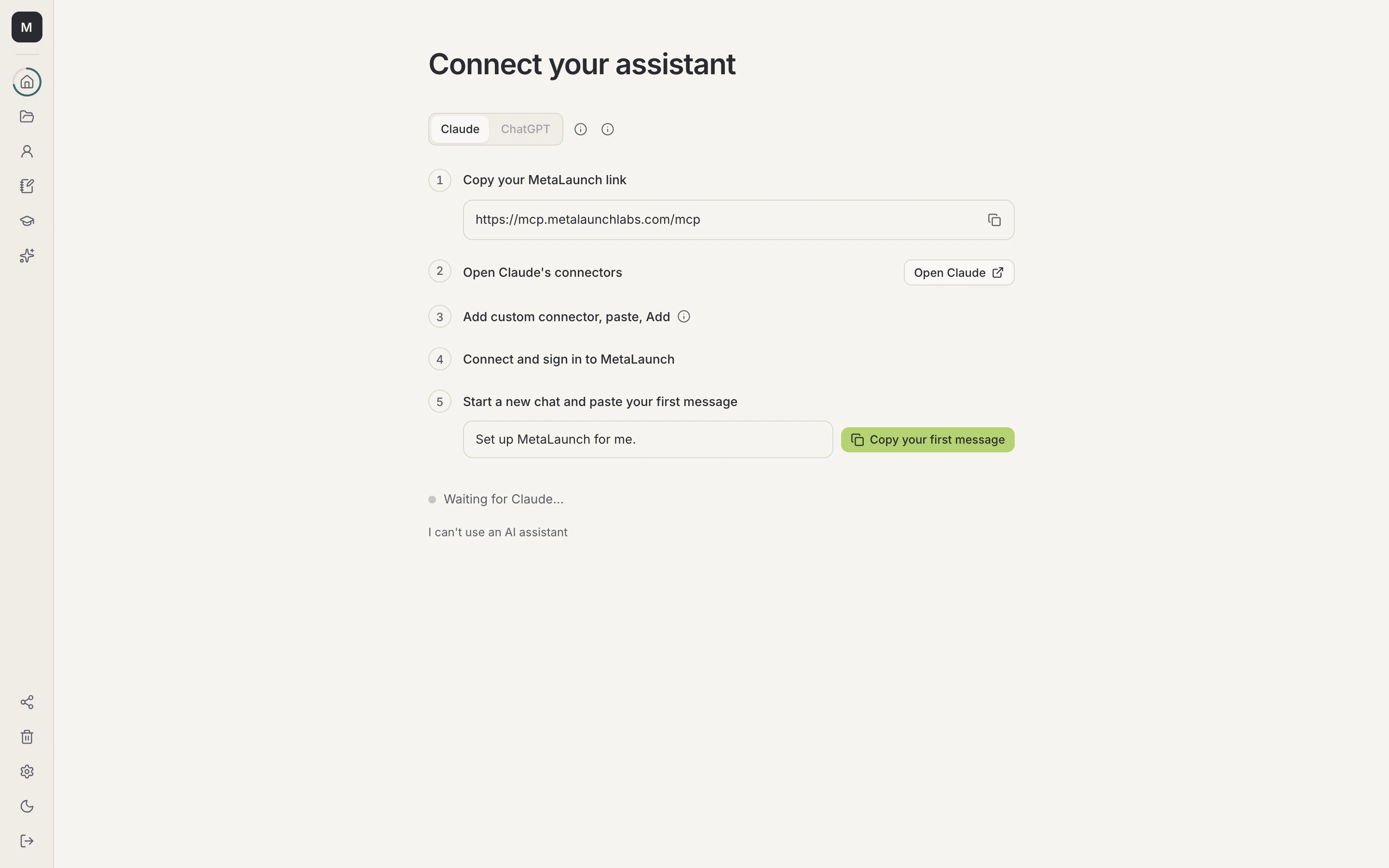
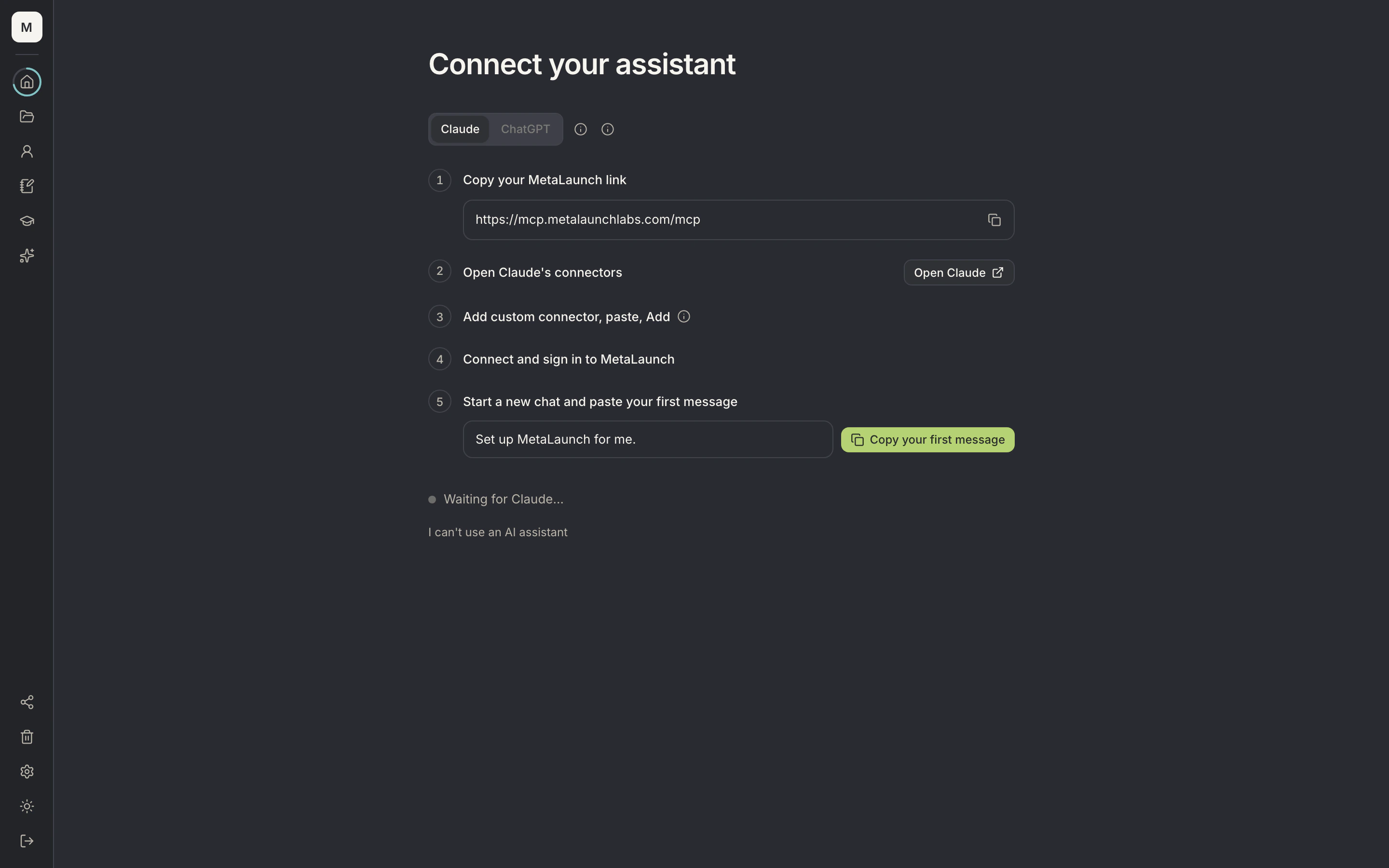
Step 1 of 4
Claude or ChatGPT
- Claude or ChatGPTStep-by-step setup for either assistant.
- Your MetaLaunch linkCopy the connector link to add MetaLaunch to your assistant.
- First messageCopy a ready first message that starts setup in your assistant.
- Connection statusShows when your assistant has connected.
Three layers: your record, what you make, and who helps.
1
Your record
Your Profile of facts and your Notes, in your own words.
- Profile
- Notes
2
What you make
Everything reads from your record, framed for its audience.
- Resumes
- Docs
- Applications
3
Who helps
Help that works from your facts, with your say on every change.
- Your Assistant
- Skills
- People you share with
Honest AI
What AI does here, and what it doesn't.
A lot of software calls itself AI-powered because it has a chatbot in the corner. Here is exactly what AI does on MetaLaunch.
It does
- Reads your Profile, Notes, resumes, Docs and Applications when you ask it to
- Suggests changes you see as one list and apply only if you agree
- Asks you when a fact is missing, instead of guessing
- Saves a Note in your words when you tell it a goal or a story
- Uses only the Skills you own
It doesn't
- Invent facts: numbers, dates, titles, employers and outcomes come only from you
- Keep what it adds without you: its Profile entries stay marked until you keep them
- Delete anything or mark an Application submitted without asking
- Rewrite Docs you mark as your own words: there it only comments
- Buy anything: you unlock Skills on the web
- Skills stay expert
- Most Skills run on MetaLaunch's servers. Your resume gets suggestions shaped by the Skill; the guide's text stays with us.
- You can always leave
- Disconnect your Assistant from Settings, export everything or delete your account whenever you want.
- Sharing is yours to decide
- Share a Doc or an Application to view, comment or edit, or your Profile to view or comment, and stop sharing at any time.
For institutions
Staff AI is narrow on purpose.
- Staff can connect an Assistant to comment on student resumes. It sees only what that staff member can see.
- Entries a student hides on their Profile stay hidden from staff.
- Eligibility, offer rules and segments aren't AI: they apply the rules your office writes, and tell students why when a rule blocks them.
Questions
What is MCP?
The Model Context Protocol is an open standard that lets an AI assistant use tools in other apps. MetaLaunch uses it so Claude or ChatGPT can work with your MetaLaunch account, with your permission.
Which Assistants work?
Claude and ChatGPT today, through MCP.
Do I need an Assistant to use MetaLaunch?
No. Everything works on the web. Connecting an Assistant makes writing and tailoring faster.
Can I disconnect my Assistant?
Yes, any time, from Settings. It loses access straight away.
Does my Assistant see a Skill's full text?
Usually not. Most Skills run on MetaLaunch and send back suggestions; their text stays on our servers.
Can my Assistant buy things?
No. Purchases happen on the web only. Your Assistant uses only the Skills you own.
AI on your facts, with you in charge.
Free for students. Placement teams can see it in a demo.